Snapchat
How do you upload a Spotlight on Snapchat?
By Yash Dutta · · Updated

Table of contents
Uploading a Spotlight on Snapchat is a quick and easy process. Spotlight is the Instagram Reels equivalent of Snapchat. Here’s a step-by-step guide to help you get started.
Open the Snapchat App
- Launch the Snapchat App: Start by opening the Snapchat application on your device.
- Access Spotlights: At the bottom right of the screen, you will see a small play button. Tap on it to view the Spotlights section.
Navigate to the Spotlights Section
- View Spotlights: Once you tap the play button, you will see various Spotlights at the top of the screen.
- Upload Your Own Content: To upload your content, look for the plus icon at the top right of the screen and tap on it.
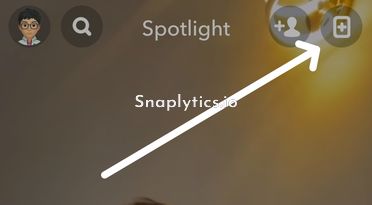
Submit to Spotlight
- Choose Upload Option: You will be presented with two options: “Upload a Video” or “Create One.” For this guide, let’s choose “Upload a Video.”
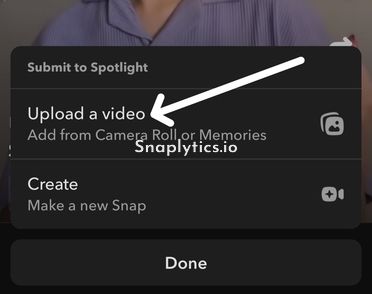
- Select from Camera Roll: This option will bring up your camera roll and memories. Choose the videos you wish to upload.
- Select Videos: Tap on the videos you want to upload and hit the check mark to confirm your selection.
Preview and Edit
- Preview Your Video: Once selected, you can preview your video.
- Add Enhancements: You have the option to add music, filters, or any other enhancements you prefer.
Finalize and Post
- Ready to Share: Ensure that the “Spotlight” option at the top is checked. You can also add a description or topic tags if desired.
- Post to Spotlight: When you are ready, tap the share or send button at the bottom right to post your Spotlight.
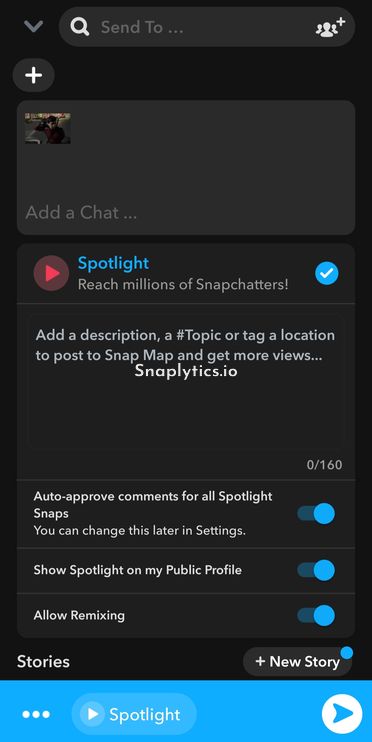
That’s it! Your video is now uploaded to Snapchat Spotlight and should be visible on your public profile. Now after uploading if you want to save your Spotlight, then you can save it from inside the Snapchat app but for Spotlight videos of others, you can use our Snap video download tool to save Spotlight videos to your gallery.