Snapchat
How to Download Snapchat Stories Without the App?
By Yash Dutta · · Updated

Snapchat stories are fun, short-lived content that disappears after 24 hours. But what if you want to save these stories without installing the Snapchat app? Here’s a step-by-step guide to help you view and download Snapchat stories using our web-based tool.
How to download Snapchat Stories?
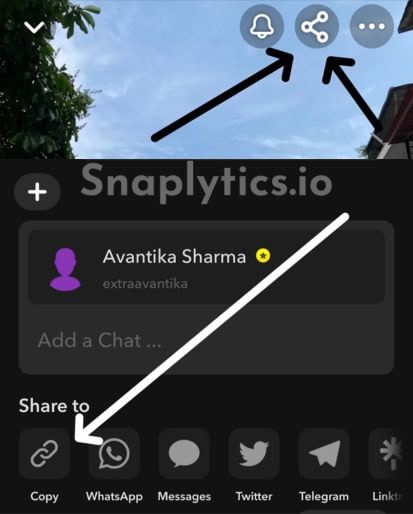
- Find the Username or Profile Link
- Get the Snapchat username of the account you want to view.
- Or copy the public profile link from their Snapchat profile.
- Use the Snaplytics Snapchat Story Downloader
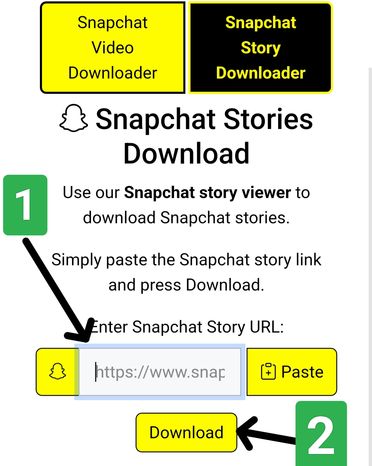
- Open your web browser, and go to the Snapchat Story Downloader page.
- Paste the username or profile link in the input box
- View and Download Content
- Click the download button.
- Wait for the tool to load available stories and spotlight videos.
- Download the stories you want to save by tapping the download button under them.

Benefits of Using an Online Story Viewer
- No need to install the Snapchat app.
- Save storage space on your device.
- Quick and simple process.
- Works on any device with a web browser.
- Free to use.